Buyer Portal v1.2.0: Nationwide Release
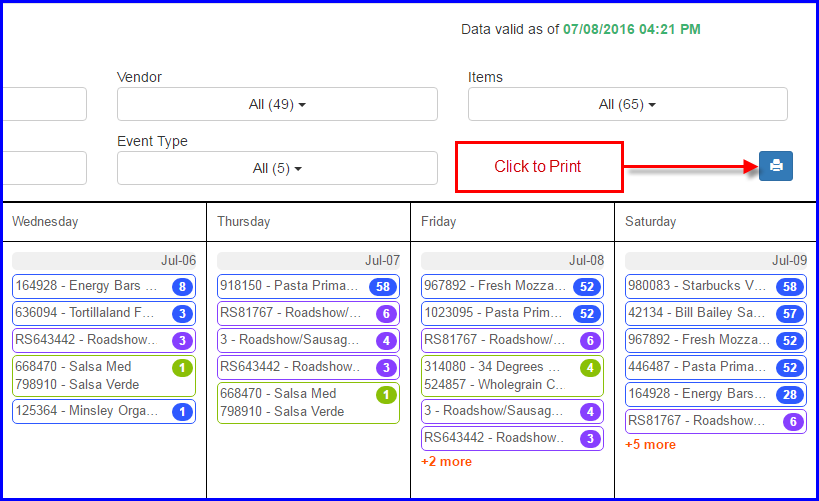
Printable Version of the Calendar 
You can now print the Calendar by clicking on the Calendar Icon above the Calendar. Please note that the printing is currently ONLY available from your computer and not your Mobile Devices. In addition, printing has been optimized for your Chrome browser to print as large as possible on a single page. However, if you have Roadshows with 6 items, this will make the Rows of your Calendar very tall and may cause the Printable version to overflow to 2 pages.
DPIS Link in Today’s Events
You can see the full DPIS information for any Event by clicking on the Print Icon for the Event in Today’s Events. This will open up a PDF copy of the DPIS in a new browser window where it can be reviewed and/or printed. This feature is available from your computer and not your Mobile Devices.

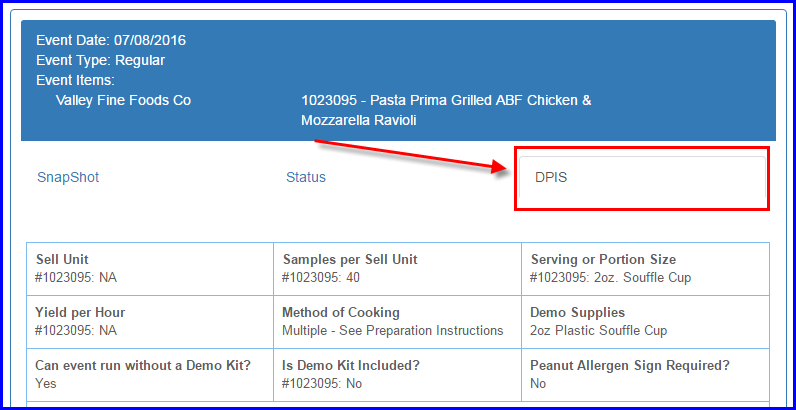
DPIS tab added to Event Popup 
Important DPIS information has been added to a new tab in the Event Popup including Serving Size, Preparation Instructions, Allergens, Enhancements, etc. NOT included in the DPIS Tab view are Selling Points and Survey Questions. Complete DPIS information, including Selling Points and Survey Questions can be found in the DPIS link in Today’s Events. This feature is optimized for Mobile Devices.
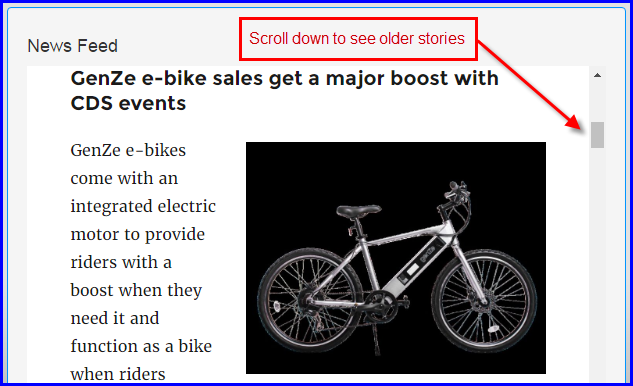
News Feed on the Dashboard
A Daymon/Industry news feed has been added to the Dashboard. Articles will be updated on a regular basis. You can scroll down to view all articles posted historically. This feature is optimized for Mobile Devices.
Various Bug Fixes
- Item drop down missing from Event Feedback Report
- Maximize width of Events in Calendar for Mobile Devices
- Sort Vendor Performed Events with all other Events
- Fix Did Not Run popup where history overruns the width of the screen on Mobile Devices
- Remove extra space in Location list in Event Popup